March 13, 2007

Finding the file's mime type (MimeType)

I was looking for this for some time now. Simple, but beautiful solution:

public string GetMimeType(byte[] fileBytes)
{
try
{
ContentInfo info = new ContentInfo(fileBytes);
return info.ContentType.Value;
}
catch
{
return "application/octet-stream";
}
}

How to get (download) an attachment

If you want to get an attachment from a note, then you have to get it using HTTP call. The following function returns an array of bytes that can be saved into a stream or you can convert it to Base64String (System.Convert.ToBase64String(myBytes)) if you want to save it again in CRM.

private byte[] GetAnnotationAttachment(Guid annotationId)
{
Guid attachid = annotationId;
int objecttypecode = 5;
//Annotation attachment OTC
string url = _serverUrl + "Activities/Attachment/download.aspx?AttachmentType=" + objecttypecode.ToString() + "&AttachmentId=" + attachid.ToString();
System.Net.WebClient myWebClient = new System.Net.WebClient();
myWebClient.Credentials = System.Net.CredentialCache.DefaultNetworkCredentials;
return myWebClient.DownloadData(url);
}

March 12, 2007

HTTP status 401: Unauthorized error

I wrote some callouts that use CRM web service for reading some additional data.

Man I was furious! On the test system it worked, on the production I got the 401 unauthorized error.

I Goggled a bit and then I tried the simplest solution:

  • Comment out the code: crmWebService.PreAuthenticate = true;

And it worked!

Guess what? This code was copied from Microsoft CRM 3.0 SDK.

Callout setting files

I created a callout, but I wanted to have an additional XML settings file that can be changed on live system without restarting all necessary services.

You have two options:

  • You can hardcode the full path to the file (bad solution)
  • You can read the file from the "running folder"

The default running folder is:
%windows install folder%/system32/inetsrv.

So put your XML file in this folder and read it from the callout using:

XmlDocument settings = new XmlDocument();
settings.Load(Path.GetFullPath("CalloutSettings.xml"));

That's it folks!

January 11, 2007

Optimizing the Performance of Microsoft Dynamics CRM 3.0 White Paper

Yesterday Microsoft published a white paper that describes how to optimize the performance of your CRM 3.0 system.

This white paper discusses how to optimize the performance of your Microsoft Dynamics CRM 3.0 system. You’ll learn how re-indexing, de-fragmenting, and regularly maintaining your databases can increase the speed with which Microsoft Dynamics CRM accesses your data. The white paper includes more advanced techniques as well, such as improving report performance, configuring Microsoft SQL Server, and optimizing Microsoft Internet Information Services and the .NET Framework. You’ll find complete SQL scripts that you can copy and use immediately. Finally, you’ll find links to additional information and resources, such as performance enhancements, security updates, Knowledge Base articles, and related Microsoft Dynamics CRM documentation.

January 9, 2007

Best Practices for Better Performance from Your Custom Code

I found this article in the official Microsoft Dynamics CRM Team Blog:

It points out some things you should keep in mind when creating a custom code.

http://blogs.msdn.com/crm/archive/2007/01/09/best-practices-for-better-performance-from-your-custom-code.aspx

December 20, 2006

How to change status of the dynamic entity?

This feature is not well documented, so I decided to describe it here:

//Create a request object
SetStateDynamicEntityRequest stateRequest = new SetStateDynamicEntityRequest();

//Use string and not integer value for state. (For Lead use "Qualified" and not 2)
stateRequest.State = newState;
state
Request.Status = newStatus;

//Create an instance of the entity
Moniker m = new Moniker();
m.Id = entityId;
m.Name = myDynamicEntity.Name;

//Set the state. Well... set the entity.
state
Request.Entity = m;

//Send the request
SetStateDynamicEntityResponse res = (SetStateDynamicEntityResponse)_crmService.Execute(state
Request);


Pretty simple, huh?

For a complete list of state and status values take a look in the SDK. You should find an enumeration for every built-in entity state together with allowed status reasons.
The name should be State Enumeration (LeadState Enumeration). Custom entities state is "Active" or "Inactive".


Of course you can use strong typed entities: (but I prefer dynamic ones)

lead myLead = new lead();
Status statusCode = new Status();
statusCode.Value = 3;
myLead.statecode = LeadState.Qualified;
myLead.statuscode = statusCode;

December 7, 2006

CRM on PlayStation Portable

Now you can tell your boss that you use your PSP for work and not for fun.

November 24, 2006

Free XML tools you need

XML Notepad 2007

Three days ago Microsoft released a new version of XML Notepad. They fixed the bug in Vista installation and added some new features. Tree View is synchronized with Node Text View for quick editing of node names and values, drag/drop support for easy manipulation of the tree, instant XML schema validation and more.

Get it here:
http://www.microsoft.com/downloads/details.aspx?FamilyID=72d6aa49-787d-4118-ba5f-4f30fe913628&DisplayLang=en


XPath Builder

Another great free app is the XPath Builder. It allows you to quickly create XPaths, and display results. Intellisense supported!!!

http://www.bubasoft.net/xpathbuilder/Xpathbuilder2.aspx

November 21, 2006

Creating many to many relationships

OK. Don't be too excited. As I said in previous posts, custom many-to-many relationships are not possible, but there is a way to create "quasi" m:n relationships.

My idea was to create a many-to-many relationship in a way it is done in a standard SQL server. If you want to connect two entities with this type of relationship, you have to create a connecting entity.
Actually this is not so bad at all. The connecting entity can provide us with additional info about the relation.
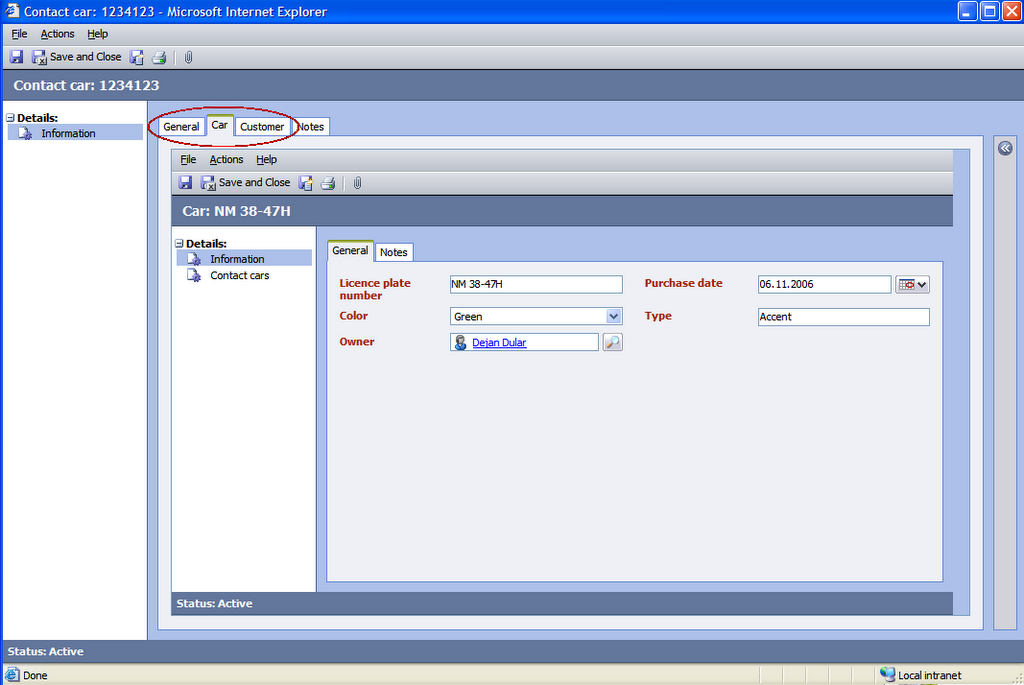
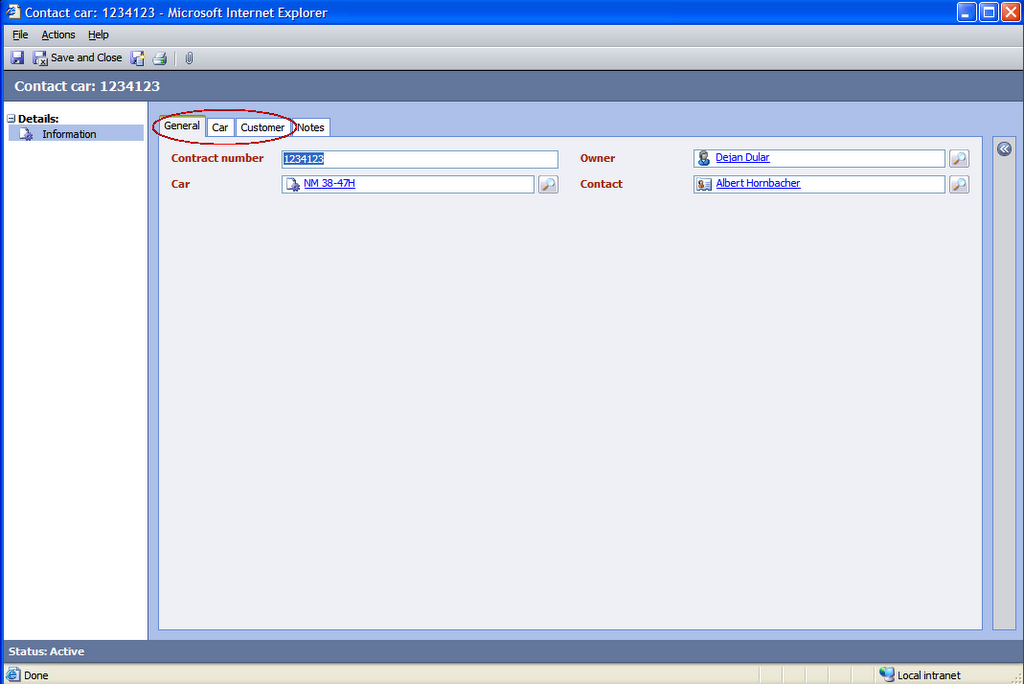
The form will have two additional tabs with IFRAME objects, where the related object forms will be displayed. You can see the results in these two pictures


I want to create a solution that is supported by CRM SDK, so it can be upgraded to next versions of Microsoft CRM.


PLOT
We have two entities, a Contact and a custom entity Car. The Car entity represents a company car that we rent to our customers. We want to create a many-to-many relationship (a contract) between Car and Contact entities. In the relationship we want to store some additional info, let's say the contract number.


SOLUTION

Entities
At first we have to create a connecting relationship. I will name it "Contact car". The primary attribute is the contract number.

The Car entity's primary attribute is the license plate number, the Contact's primary attribute is full name, so we won't have a problem identifying the objects in the views.

Relationships
Create two many-to-one relationships in the "Contact car" entity. I decided to create a parental relationship with Contact and "Referential, restrict delete" with Car. Restrict delete is important, otherwise you can lose data when deleting a car. Well... You can decide your own logic here.

Forms
First add both lookup fields to the form (Car and Contact). Then add two tabs to the Contact car form named Car and Contact. Add an IFRAME in each tab. Name them IFRAME_Car and IFRAME_Contact. Set the URL to about:blank.
Now let's go to scripts:
You'll need Car entity type code, which you can find in http://serverName/sdk/list.aspx

Form onLoad
On each load of the page, a related entity must be displayed in the IFRAME:

var contactLookupItem = new Array;
contactLookupItem = crmForm.all.new_contactid.DataValue;

if (contactLookupItem && contactLookupItem[0] != null)
{
var sCustUrl = "http://ServerName/sfa/conts/edit.aspx?ID=" + contactLookupItem[0].id;
document.all.IFRAME_Contact.src = sCustUrl;
}

var carLookupItem = new Array;
carLookupItem = crmForm.all.new_carid.DataValue;

if (carLookupItem && carLookupItem[0] != null)
{
var sCarUrl = "http://
ServerName/userdefined/edit.aspx?id=" + carLookupItem[0].id + "&etc=CarEntityTypeCode";
alert("REdirecting..." + sCarUrl);
document.all.IFRAME_Car.src = sCarUrl;
}


We have to change the forms if lookup fields change:

Car lookup field onChange

var oField = event.srcElement;

var carLookupItem = new Array;
carLookupItem = oField.DataValue;


if (carLookupItem && carLookupItem[0] != null)
{
var sCarUrl = "http://ServerName/userdefined/edit.aspx?id=" + carLookupItem[0].id + "&etc=EntityTypeCode";
document.all.IFRAME_Car.src = sCarUrl;
}


Contact lookup field onChange

var oField = event.srcElement;

var contactLookupItem = new Array;
contactLookupItem = oField.DataValue;


if (contactLookupItem && contactLookupItem[0] != null)
{
var sContactUrl =
"http://ServerName/sfa/conts/edit.aspx?ID=" + contactLookupItem[0].id;
document.all.IFRAME_Car.src = sCarUrl;
}


Views
Update all Contact car views to display Car and Contact lookup, so users can quickly identify the records.


This is it. I can't say it's GREAT solution, but it's still better than nothing. Users can see Contact's an Car's data in the same form. They can even change them, using the buttons in the IFRAME.

You could hide the buttons in the IFRAME forms or disable the form (document.all.IFRAME_Car.document.body.disabled = true;), but I haven't found a supported way to do this.